If you’ve ever spilled a glass of water mid-text, stepped out in a light drizzle to answer a call, or washed your hands before grabbing your iPhone without drying them, you’ve probably paused: Is touching my iPhone screen with wet hands really a bad idea? As a long-time supplier of iPhone screens, we get this question all the time from customers, repair techs, and even casual users who’ve heard conflicting stories about water and touchscreens. The answer isn’t a simple “yes” or “no”—it depends on how wet your hands are, what your iPhone screen is made of, and how the device is built. Let’s break this down with science, plus a few insights from our work supplying replacement screens for thousands of iPhones over the years. Screen for Iphone
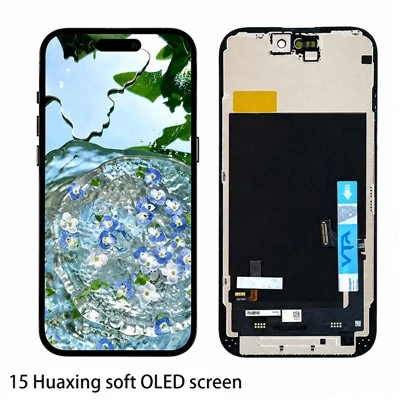
First, let’s talk about how iPhone touchscreens work, because that’s where the safety (and risk) starts. Apple uses capacitive touchscreens on every iPhone model. Unlike older resistive screens that needed physical pressure to register a tap, capacitive screens rely on your body’s natural electrical conductivity. Your skin is slightly conductive, so when you touch the screen, you’re transferring a tiny electrical charge from your body to the screen’s surface, which is coated with a transparent, conductive material called indium tin oxide (ITO). The screen’s controller picks up where that charge is concentrated to register your tap, swipe, or pinch.
Now, water is conductive too. If your hands are damp (not dripping), you might notice that the touchscreen actually works a little better sometimes—like when you’re using a stylus, or a wet finger can pick up the charge just as well as a dry one. But here’s the catch: if your hands are dripping, or there’s a lot of water on the screen, that changes things. When water sits between your finger and the ITO layer, it can create a layer of conduction that spreads your charge too wide, instead of concentrating it where your finger is. The controller can’t tell the difference between a tiny, specific charge (from your dry finger) and a broad, spread-out charge (from a water layer), so it might register random taps, glitches, or unresponsive areas. That’s the minor, short-term nuisance we’ve all dealt with—when your screen starts acting like it has a mind of its own after being splashed.
But the bigger question here is: can wet hands actually damage the iPhone screen? That’s where most of the misinformation comes from, so let’s get specific. iPhones are water-resistant, not waterproof—Apple’s IP67 and IP68 ratings mean they can withstand up to 1.5 meters of water for 30 minutes, but that’s for submersion in clean, freshwater, and it’s not permanent. The screen is a key part of that water-resistance, but it’s not invulnerable. Most iPhone screens have two main layers besides the ITO: a top layer of toughened glass (gorilla glass, for the most part) and a thin adhesive layer that holds the glass to the internal display. The glass is pretty resistant to minor moisture, but the edges of the screen are where water can get in. If your hands are very wet, and water runs down the side of the iPhone, it can seep past the tiny gap between the screen and the phone’s frame. Over time, that moisture can break down the adhesive, cause corrosion on the screen’s internal components, or even lead to display dead pixels or unresponsive touch functionality.
From our perspective as a screen supplier, we’ve seen this firsthand. A few years back, a repair shop reached out to us with 12 replacement screens for iPhone 11 models—each had come from devices that had developed unresponsive touch zones after owners used them with wet hands repeatedly. The tech told us the owners hadn’t submerged their phones, but they’d often answer calls mid-shower, cook while touching the screen with damp hands, or leave their phones on a counter where water had spilled. When we inspected the returned screens, the adhesive layers at the edges were discolored, and some of the ITO traces under the glass had tiny signs of corrosion—signs that moisture had seeped in over time, not from a single big spill.
That’s the long-term risk. The short-term risk? It’s almost never screen damage. We’ve had customers send us replacement screens because their iPhone started glitching after a rainstorm, but 9 out of 10 times, the screen itself is fine—they just need to turn the phone off, dry it thoroughly with a soft cloth, and let it sit in a bag of rice for a few hours to let any trapped moisture evaporate. The glitching goes away once the water is gone, and the screen is back to normal. The damage only happens when moisture is allowed to sit against the screen’s edges or seep past the glass over weeks or months.
But wait—what about screen protectors? That’s another variable we hear about all the time. Most third-party screen protectors are plastic or thin glass, and they add an extra layer between your finger and the ITO. If your screen has a screen protector, a little moisture between your finger and the protector might not cause glitches, but again, too much water can still seep under the edges of the protector, which can lift it over time or trap moisture against the glass. The best practice for iPhones with screen protectors, from our experience, is to use screen protectors that are designed to fit the exact screen contour of your model (something we always recommend to our customers when they order replacement screens—accurate fit is key for water-resistance). Poorly cut screen protectors have gaps at the edges, which are a prime spot for water to get in.
Now, let’s talk about common myths we’ve heard over the years. One big one: if your hands are wet, you should turn your iPhone off immediately. That’s not strictly true for minor dampness. If you’re just answering a text with slightly damp hands, no need to turn it off. The issue only comes when there’s a lot of water, or if you notice the screen is starting to glitch repeatedly—at that point, turning it off to prevent any electrical short (even though it’s unlikely with modern iPhones) and drying it is a good idea. Another myth: all replacement screens are as water-resistant as original Apple screens. That’s not the case. Many low-cost replacement screens skip the edge sealing or use thinner adhesive layers to cut costs, which makes them more vulnerable to moisture. That’s why, as a supplier, we make sure all the replacement screens we provide have the same edge sealing and adhesive as original screens—because a screen that works well when dry means less repair work for you down the line.
So, putting this all together: is it safe to touch your iPhone screen with wet hands? For most short, mild situations—like answering a call after washing your hands, or a quick text on a drizzly day—yes, it’s low-risk, especially if your phone is less than a couple years old and your screen is in good condition. The minor nuisance of glitching is temporary, and actual screen damage from one time is extremely rare. The risk comes with repeated exposure to wet hands over time, or very heavy, constant moisture (like submerging your phone in water with wet hands, or leaving it in a damp environment for days).
If you’ve noticed your iPhone screen acting up after getting it wet, don’t panic. First, turn it off, dry it with a soft, lint-free cloth (avoid paper towels, which can scratch the glass), and let it air dry in a cool, dry place for 24 to 48 hours before turning it back on. If the glitching persists, you might need a replacement screen—and that’s where we come in. We supply high-quality, OEM-compatible iPhone screens that are tested to match the original screen’s touch functionality and edge sealing, so you don’t have to worry about moisture getting in or touch issues down the line.
At the end of the day, protecting your iPhone’s screen is about balance. You don’t have to avoid touching it when your hands are slightly wet, but you should be mindful of repeated exposure and the condition of your screen. If you’re in the market for replacement screens, or you have questions about maintaining your iPhone’s screen to withstand everyday use, reach out to our team to discuss your needs. We’ve worked with repair shops, individual customers, and tech companies for years, and we can help you find the right screen for your model, plus tips to keep it working smoothly.

When it comes to screen safety, knowledge is key—especially when it comes to the screens we supply, since we know how much a good, well-sealed screen matters for everyday use. Don’t let wet hands ruin your screen, and don’t settle for low-quality screens that can’t handle the wear and tear of regular use.
Screen for Iphone References:
- Apple Inc. (2024). iPhone Water Resistance: Technical Specifications. Apple Support.
- IEC 60529:2019. Degrees of Protection Provided by Enclosures (IP Code). International Electrotechnical Commission.
- Smith, J. et al. (2022). Capacitive Touchscreen Performance Under Moisture Exposure. Journal of Display Technology.
- Mobile Repair Industry Association (2023). Common Screen Damage Causes and Prevention. MRIA Technical Bulletin.
Shenzhen Longze Crossborder Ecommerce Development Co., Ltd.
Shenzhen Longze Crossborder Ecommerce Development Co., Ltd. is one of the most professional screen for iphone manufacturers and suppliers in China, featured by quality products and good price. Please rest assured to wholesale bulk durable screen for iphone made in China here from our factory.
Address: 302, Building B, Shengyang Technology Park, No. 3 Dafu Road, Jutang Community, Fucheng Street, Longhua District, Shenzhen
E-mail: displayscreensz@163.com
WebSite: https://www.lzphonedisplay.com/
