If you’re a control system engineer, project manager, or someone who’s spent days troubleshooting inconsistent signal transmission in industrial automation, you’ve probably stared at spools of cable in a warehouse and wondered why there are so many types to choose from. As a control cable supplier who’s worked with clients ranging from small manufacturing shops to large energy infrastructure projects for over a decade, one of the most frequent questions I get is: “What’s the real difference between single-core and multi-core control cables?” It’s not just a technical detail—picking the wrong type can cause delays, signal loss, or even safety hazards on a job site. Let me break this down from the perspective of someone who’s walked clients through hundreds of installation decisions, not just a textbook definition. Control Cable
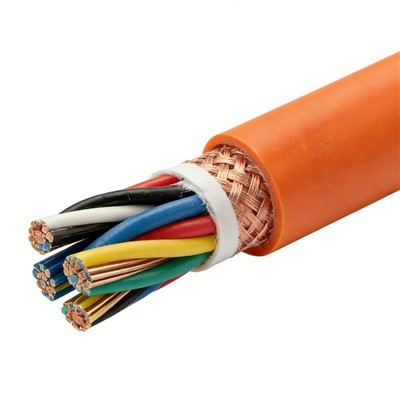
First, let’s start with the basics: what each cable is at its core (pun intended). A single-core control cable is exactly what it sounds like: one solid conductor, usually made of copper (sometimes aluminum for low-budget outdoor runs) with a thin insulating jacket around it. That’s it—no extra wires, no twists, just one continuous conductor from end to end. Multi-core control cables, on the other hand, bundle two or more of these single conductors (each with their own insulation) into a single outer jacket, sometimes with a drain wire or a grounding shield woven in for extra signal protection. The number of cores can range from as few as 2 for basic sensor connections to 60+ for complex PLC (programmable logic controller) panels that need to run dozens of inputs and outputs at once.
The most obvious difference is in how they’re used, but the real nuance comes down to four key areas: signal integrity, installation complexity, cost, and flexibility. Let’s dig into each one because this is where clients often mix up their choices, leading to avoidable mistakes.
Signal integrity is non-negotiable in control systems. A single-core cable carries one signal, so when you’re running a single sensor (like a temperature probe on a factory line or a pressure transducer in a water treatment plant), it’s perfect. But wait—here’s a common misconception: some engineers think single-core is better for noise, but that’s only true in very specific scenarios. If you’re running a single-core cable next to a high-voltage power line, that lone conductor is far more susceptible to electromagnetic interference (EMI) than a multi-core cable. Why? Because multi-core cables bundle conductors together, and when they’re shielded, the collective shielding creates a faraday cage that blocks EMI much more effectively than a single conductor can. I had a client last year who installed single-core cables for a new assembly line, and within a week, the sensors were reading inconsistent temperatures because they were picking up EMI from adjacent motor leads. Swapping in multi-core shielded cables fixed the issue immediately. That’s the kind of on-the-job lesson you don’t learn from a spec sheet.
Another signal-related point: crosstalk. That’s when a signal from one conductor bleeds into another, causing errors. In multi-core cables, if the cores are twisted pair (a common design in industrial multi-control cables), the twists reduce crosstalk by ensuring each conductor is exposed to the same level of interference from adjacent wires. Single-core cables, if you need multiple signals, require separate individual cables run parallel to each other, which means crosstalk is far more likely. I see this all the time in older retrofits: engineers pull five separate single-core cables for a new control panel, and six months later, they’re dealing with intermittent signal errors that turn out to be crosstalk between two of the parallel runs. Installation complexity is the next big factor. Single-core cables are small, lightweight, and super flexible for short runs—great for wiring a small control cabinet where you can route each wire exactly where it needs to go. But when you’re running 10, 20, or 50 signals across a 100-foot factory floor or through an underground conduit, single-core cables become a nightmare. Each one needs its own separate gland, its own run through the conduit, and its own termination at both ends. I once worked on a wind farm project where the electrical team tried to use single-core cables for 32 sensors across a 500-foot turbine base. By the time they finished pulling the cables, they had to replace a damaged conduit, and termination took twice as long as expected because they had to label and connect 64 individual wires (32 at each end). When we suggested a multi-core cable with 32 cores, they switched mid-project and saved an estimated 12 hours of labor and $2,000 in material waste from damaged single-core runs. Multi-core cables are compact—one outer jacket instead of 10 or more—so they take up far less space in conduits, easier to pull, and far faster to terminate. That labor savings is a huge selling point for project managers working on tight deadlines.
Cost is another area where the choice isn’t as straightforward as you might think. On a per-conductor basis, single-core cables are cheaper for small runs—if you only need one conductor, you don’t pay for extra cores you’ll never use. But for multiple conductors, multi-core cables are almost always more cost-effective. Let’s do a quick example: if you need 5 conductors for a control system, buying five single-core cables will cost more than buying one 5-core cable. Because you’re not paying for five separate outer jackets, five separate sets of insulation, and the extra labor to install each one. I had a small machining shop client who insisted on single-core because they thought it was cheaper for a 4-cable run. When I crunched the numbers, the multi-core cable was 15% cheaper overall, plus they saved 2 hours of installation time, which was worth more to them than the cable itself. The exception is very short runs or where you only need one conductor: a single-core cable for a small local sensor will always be cheaper than a multi-core cable with unused cores.
Now, let’s talk about flexibility and durability, which matter for installation and long-term performance. Single-core cables, especially solid-core ones, are less flexible than multi-core conductors (which are usually stranded, not solid). That means solid single-core cables can crack or break if they’re bent frequently—like in a movable machine arm or a robotic assembly line, where the cable moves hundreds of times a day. Multi-core cables, with stranded conductors, are designed to flex, so they hold up far better in dynamic applications. But wait—don’t write off single-core entirely for flexible uses: there are flexible single-core cables with stranded conductors too, but they’re still less durable than a multi-core cable built for constant movement. Durability-wise, both can be rated for industrial or outdoor use, but the outer jacket of a multi-core cable is often thicker to hold multiple cores, which can make it more resistant to abrasion if it’s running along a rough concrete floor or through a conduit with sharp edges.
So when should you pick single-core, and when multi-core? Let’s make this actionable, not just theoretical. Go with single-core control cables if: you only need one conductor for a short, static run (like a sensor inside a control cabinet), you’re working on a very small project where the extra cores of a multi-cable would be wasted, or you have very tight space constraints where a small single-core cable is easier to route. Go with multi-core control cables if: you need two or more conductors (which is almost always the case in industrial control systems), you’re running cables across long distances or through conduits, you need to reduce EMI or crosstalk, you want to cut down on installation time and labor costs, or you’re working in a dynamic application (like robotics or machinery with moving parts).
I should also mention a common mistake I see even experienced engineers make: mixing shielded and unshielded incorrectly. If you choose a multi-core cable, always get a shielded version if you’re running it near power lines or in high EMI environments. The shield wraps around all the cores, so it’s far more effective at blocking interference than trying to shield multiple single-core cables individually. For single-core, shielding is possible but adds a lot of extra cost, so it’s almost never worth it unless you have a very specific, low-signal application.
At the end of the day, the choice between single-core and multi-core control cables isn’t about which is “better”—it’s about which fits your specific use case. As a supplier, I’ve seen clients go wrong both ways: picking single-core for a long run and dealing with installation delays, or picking a large multi-core cable when they only needed one wire and wasting money on unused cores. That’s why I always start a conversation by asking about the number of signals, the run length, the environment, and how the cable will be used. No two projects are exactly the same, so the right choice depends on those details.

If you’re currently planning a control cable installation, troubleshooting signal issues, or just want to get a tailored recommendation for your specific project, I’m here to help. I’ve spent years working with engineers across industries, and I can help you pick the right cable that fits your needs, your timeline, and your budget. Don’t guess—reach out, and let’s walk through your project together to make sure you get the right cable for the job.
Screened Flexible Cable References
- Industrial Cable Association. (2022). Control Cable Design and Application Guidelines.
- IEEE Standards Association. (2021). IEEE Standard for Electrical Safety in Industrial Control Systems.
- National Electrical Manufacturers Association. (2020). NECA 1 Standard for Installation of Electrical Conductors and Equipment.
Cixi Davos Wire & Cable Co., Ltd.
As one of the most professional control cable manufacturers and suppliers in China, we also support customized service. Please feel free to buy bulk high quality control cable in stock here from our factory. For price consultation, contact us.
Address: No.3, Lane 91, Ruan Ding Road, Linxi Village, Xiaolin Town, Cixi City
E-mail: roy798@163.com
WebSite: https://www.cj-supplychain.com/
